
Angels Collection1.2 - App Store
You'll be able to see results in few seconds.
Publisher Description
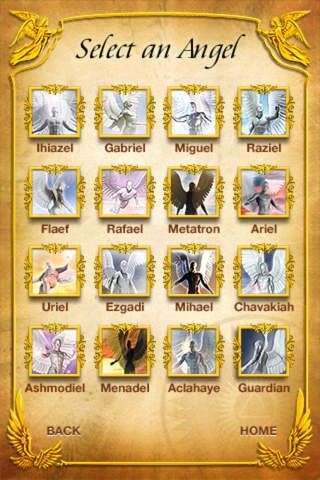
Angels the Collection:
- Keep an Angel at your side 24/7/365!
- Ask for advice from the Angels.
- Share the Angels and their advice with friends and family.
Angels the Collection was designed to help you through difficult times. If you feel like you need a helping hand with everyday decisions, this app is for you.
This app includes the first 16 Angels and Archangels out of the 72 most known Angels in history. Angels the Collection will give you guidance in Love, Relationships, Health and Prosperity. Every aspect of your daily life will be covered.
Use our newest feature eCards. Select an advice or an angel and share it via email with the picture of the angel.
From the Angel of Love, Luck, Protection, Justice and even the Angel of Sexuality. Angels give you helpful advice and the ability to share this wisdom and blessings with your friends and family.
App Features:
- Flip Screen
- Astonishing, never before seen Angels Artwork
- Angels Profiles based on professional research
- Angels advice designed according to the Angels profiles
- Share Angel Artwork
- Share Angel Advice
- 120 Advices. (more in development)
- Facebook sharing option for Advices
- Browse Advices by mood, topic or Angel
- Option to turn music on or off
Requires iOS 4.0 or later. Compatible with iPhone, iPad, and iPod touch.
About Angels Collection
The company that develops Angels Collection is Labotec. The latest version released by its developer is 1.2.
To install Angels Collection on your iOS device, just click the green Continue To App button above to start the installation process. The app is listed on our website since 2012-04-03 and was downloaded 0 times. We have already checked if the download link is safe, however for your own protection we recommend that you scan the downloaded app with your antivirus. Your antivirus may detect the Angels Collection as malware if the download link is broken.
How to install Angels Collection on your iOS device:
- Click on the Continue To App button on our website. This will redirect you to the App Store.
- Once the Angels Collection is shown in the iTunes listing of your iOS device, you can start its download and installation. Tap on the GET button to the right of the app to start downloading it.
- If you are not logged-in the iOS appstore app, you'll be prompted for your your Apple ID and/or password.
- After Angels Collection is downloaded, you'll see an INSTALL button to the right. Tap on it to start the actual installation of the iOS app.
- Once installation is finished you can tap on the OPEN button to start it. Its icon will also be added to your device home screen.
Program Details
System requirements
Download information
Pricing
Version History
version 1.2
posted on 2012-04-03
Disclaimer
Official App Store Link
We do not host Angels Collection on our servers. We did not scan it for viruses, adware, spyware or other type of malware. This app is hosted by Apple and passed their terms and conditions to be listed there. We recommend caution when installing it.
The App Store link for Angels Collection is provided to you by apps112.com without any warranties, representations or guarantees of any kind, so access it at your own risk.
If you have questions regarding this particular app contact the publisher directly. For questions about the functionalities of apps112.com contact us.
